
Microsoft 365 Business Premium is the flagship in the business segment for organizations with up to 300 users, and the license includes much of what a Norwegian mid-sized organization actually needs in 2026: identity, device management, email protection, and endpoint protection. But that does not mean the organization is secure when the license is purchased. It only means the organization can set up much better protection than before.
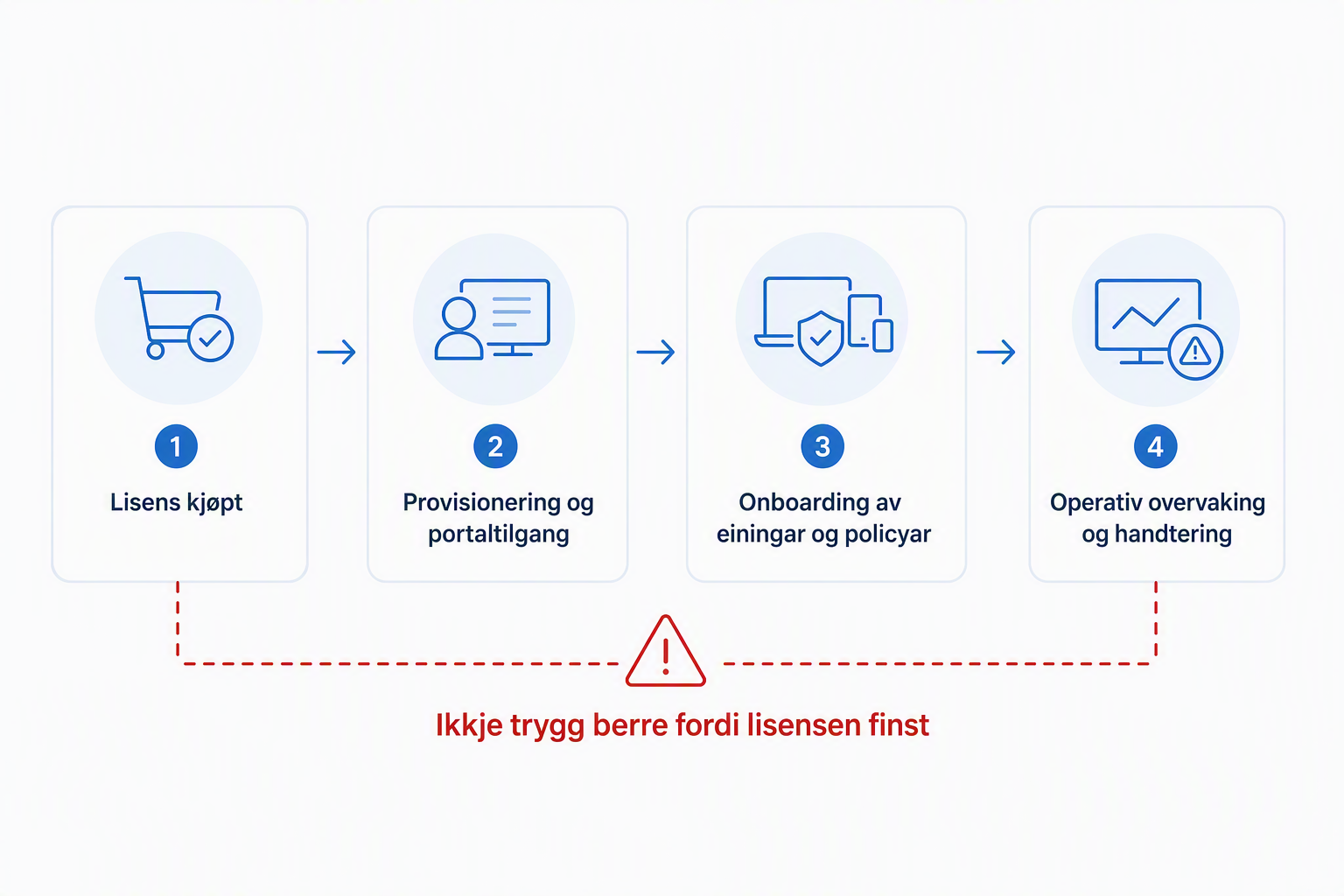
The most important point is simple: Business Premium is a licensing bundle, not a pre-secured operating state!
What do you actually get in Business Premium?
Business Premium is made for small and medium-sized organizations with 1–300 users, and includes among other things Microsoft Defender for Business, Defender for Office 365 Plan 1, Intune Plan 1, and Entra ID P1 according to Microsoft’s own documentation:
And that’s good. For many organizations this is a very solid starting point.
The problem is that many read the license list as if security is already in place. Unfortunately, it is not. This especially applies to Defender for Business.
No, Defender for Business doesn’t protect you by itself
Microsoft states that Defender for Business must be set up and configured in the Defender portal, and that the setup includes, among other things, users, roles, alerts, onboarding, and policies:
At the same time, Microsoft says in the service description that Defender for Business features are enabled at the tenant level by default:
That sounds contradictory, but it isn’t really. The service can be available in the tenant without:
- devices being onboarded
- policies being reviewed
- alerts going to the right person
- roles being assigned
- exceptions and operations being clarified
In other words: the feature can be switched on in the license while protection still doesn’t work well enough in practice.
Default policy is a starting point, not the answer key
Defender for Business has default policies for, among other things, next-generation protection and firewall, and Microsoft documents that these can be viewed, edited, and configured:
This is useful, but this is where many stop too early. Default policy doesn’t necessarily mean:
- the right balance between security and user experience
- coverage for all device types
- alignment with the organization’s admin tools
- sensible exceptions for line-of-business apps
- a plan for testing and change control
Default setup is often better than nothing. But default setup without control is still a gamble.
The first week after purchase: what you should actually do
If the organization just bought Business Premium, I would prioritize this first:
Confirm what the license actually gives you
- Business Premium is for up to 300 users and includes several core security components, but not everything Microsoft sells within security and compliance.
- Be especially precise about the distinction between what’s included and what requires add-on licenses.
Open the Defender portal and verify that setup is underway
- Check onboarding status for devices.
- Check who receives alerts.
- Check whether roles are assigned.
Go through the default policies
- Don’t just see that they exist. Verify that they fit the environment.
- Especially important if the organization has a mix of local admin rights, older apps, or uneven client standards.
Check Intune and device management
- Business Premium includes Intune Plan 1, but device management still has to be designed and introduced.
- Without management of configuration, compliance, and deployment, Defender won’t have the same effect.
Check the identity foundation
- Entra ID P1 is included, but it helps little if MFA, Conditional Access, and admin practices lag behind.
- Many small organizations still have too many Global Administrators and too little control of break-glass and privileges.
Clarify who owns operations
- Who follows up alerts?
- Who approves policy changes?
- Who takes responsibility when Defender flags something on Saturday evening?
If you want Copilot, look at the bundle first
Microsoft has now made an interesting move in the Business segment: You can buy Microsoft 365 Business Premium and Microsoft 365 Copilot for Business as a single combined solution.
For many small and medium-sized organizations I think this should be the starting point if Copilot is coming in.
You then get the productivity platform, the security features in Business Premium, and work-focused Copilot bundled in the same license. Microsoft includes, among other things, Copilot in Word, Excel, PowerPoint, Outlook, and Teams, AI based on the organization’s work data, and access to agents. At the same time, Entra ID, Intune, Defender, and Purview features sit in the foundation.
The price also makes the bundle solution interesting. For an organization that will have Business Premium anyway and wants Microsoft 365 Copilot, you should therefore compare this package before buying Copilot as a separate add-on.

But here comes the important part:
That Copilot is easy to buy doesn’t mean it should be the first thing you enable.
Before generative AI works across email, Teams, SharePoint, OneDrive, and other work data, the organization should have control of identities, access, sharing, and sensitive data.
Conditional Access should be in place. MFA and strong authentication methods should be thought through. Defender features should actually be put into operation. External sharing and old SharePoint access should be reviewed. And the organization should have a minimum of data classification and information governance.
Because Copilot doesn’t necessarily create new access to information.
But it can make information that is already too broadly accessible much easier to find, combine, and use.
Therefore I think Business Premium with Copilot can be a very good entry into Microsoft 365 for a smaller organization.
Just don’t start with Copilot.
Start with the foundation that makes it responsible to use it.
Copilot without data governance is often just a faster way to overshare
Microsoft documents that Purview can be used to manage data security and compliance for Microsoft 365 Copilot and Copilot Chat, including DLP, sensitivity labels, auditing, retention, and DSPM workflows:
But here’s the practical reality: much of this governance requires more than just Business Premium. Some requires specific Purview features, roles, setup, and in some cases separate licenses. That means you shouldn’t sell Copilot internally as “safe because we have Microsoft 365.”
What you should ask instead is:
- What data can Copilot actually find?
- Who has access to that data today?
- Do we have labels that are used in practice?
- Do we have enough audit to investigate misuse or mistakes?
- Do we have DLP controls where the risk is actually highest?
Labels are not decoration
Microsoft documents that sensitivity labels and encryption are respected by Copilot, and that access rights affect what content can be used:
In practice that means a good label strategy can make a big difference. But only if:
- labels are published
- users understand them
- content is actually labeled
- the rights behind the labels are thought through
- you monitor compliance
A label strategy that only exists in PowerPoint is not governance. It’s symbolism.
DLP for Copilot exists, but you must know what it actually does
Microsoft has documented support for DLP against Microsoft 365 Copilot and Copilot Chat, where you can block processing of files and email with certain sensitivity labels:
That’s good, but this is not the same as “Purview solves everything.” This control has limitations, its own scope, and its own prerequisites. It must be understood as a concrete enforcement of specific scenarios, not as a magic layer over all Copilot use.
This is exactly where many organizations fool themselves:
- they have visibility, but not enforcement
- they have reports, but not ownership
- they have labels, but not usage
- they have a license, but not control
Common mistakes I would look for immediately
1. Defender is “included,” but no devices are properly onboarded
This is perhaps the most common mistake. The license exists, the portal exists, but coverage is poor.
2. Default policies are untouched
That can be fine at the start, but not over time.
3. No one owns alerts and incidents
When everyone owns security, no one owns security.
4. Intune is purchased, but not implemented
You lose much of the operational value of the bundle.
5. Copilot is discussed as productivity, not as data risk
That’s the wrong order.
6. Labels are too coarse or too unclear
Then they are either not used, or they provide poor governance.
7. Mixing up Copilot, Copilot Chat, and Copilot licenses
That creates bad expectations, wrong budgets, and poor governance.
Is Business Premium enough in 2026?
For many organizations: yes, as a foundation.
For some organizations: no, not on its own.
Business Premium is often a good level for organizations that need:
- better identity protection
- better client management
- better baseline endpoint protection
- better email protection
- a realistic security level without an E5 budget
But if the organization has high risk, strict regulatory requirements, a lot of sensitive information, weak internal operational capacity, or large exposure to phishing, CEO fraud, and data leaks, you must assess whether the baseline in Business Premium is enough. In such environments it’s often not the license that is too weak first. It’s the capacity to operate and govern the solution well enough.
Honestly?
Business Premium is often a good purchase. But the most dangerous thing about the bundle is that it looks finished on paper.
You don’t become secure by buying Business Premium. You become more secure by:
- enabling and using what’s included
- assigning responsibility
- adjusting policies
- onboarding devices
- cleaning up identities and access
- governing data before you unleash Copilot
The license is the start. Not the answer key.