
One of the things I brought home from Workplace Ninja Summit in Baden was how much the device actually matters to the identity.
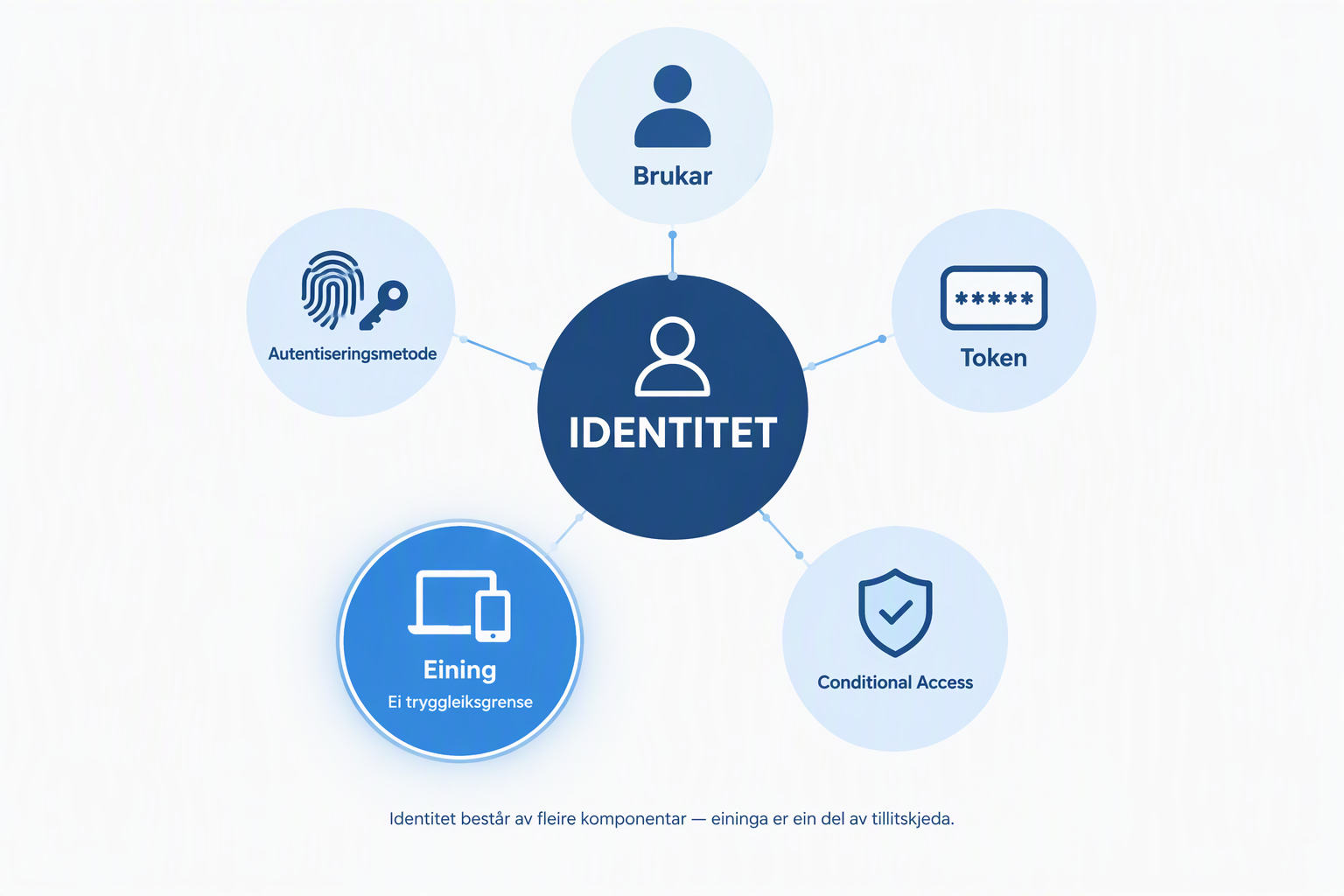
We talk a lot about MFA, passkeys, Conditional Access, and tokens. But the device isn’t just something the user sits in front of when they sign in.
The device can itself become part of the trust chain.
That point was clear across sessions on modern identity attacks, device trust, passkeys, and privileged workstations. Shortly after the conference, concrete attacks made the issue far less theoretical.
Because what happens if an attacker not only gets a session, but manages to register their own device in Entra ID?
Then Revoke sessions + reset password can be the start of incident response. Not the end.
Device code flow was already on my block list
At Workplace Ninja Summit we saw how legitimate authentication mechanisms can be abused. One concrete takeaway I brought home was:
Block device code flow with Conditional Access unless you have a documented need for it.
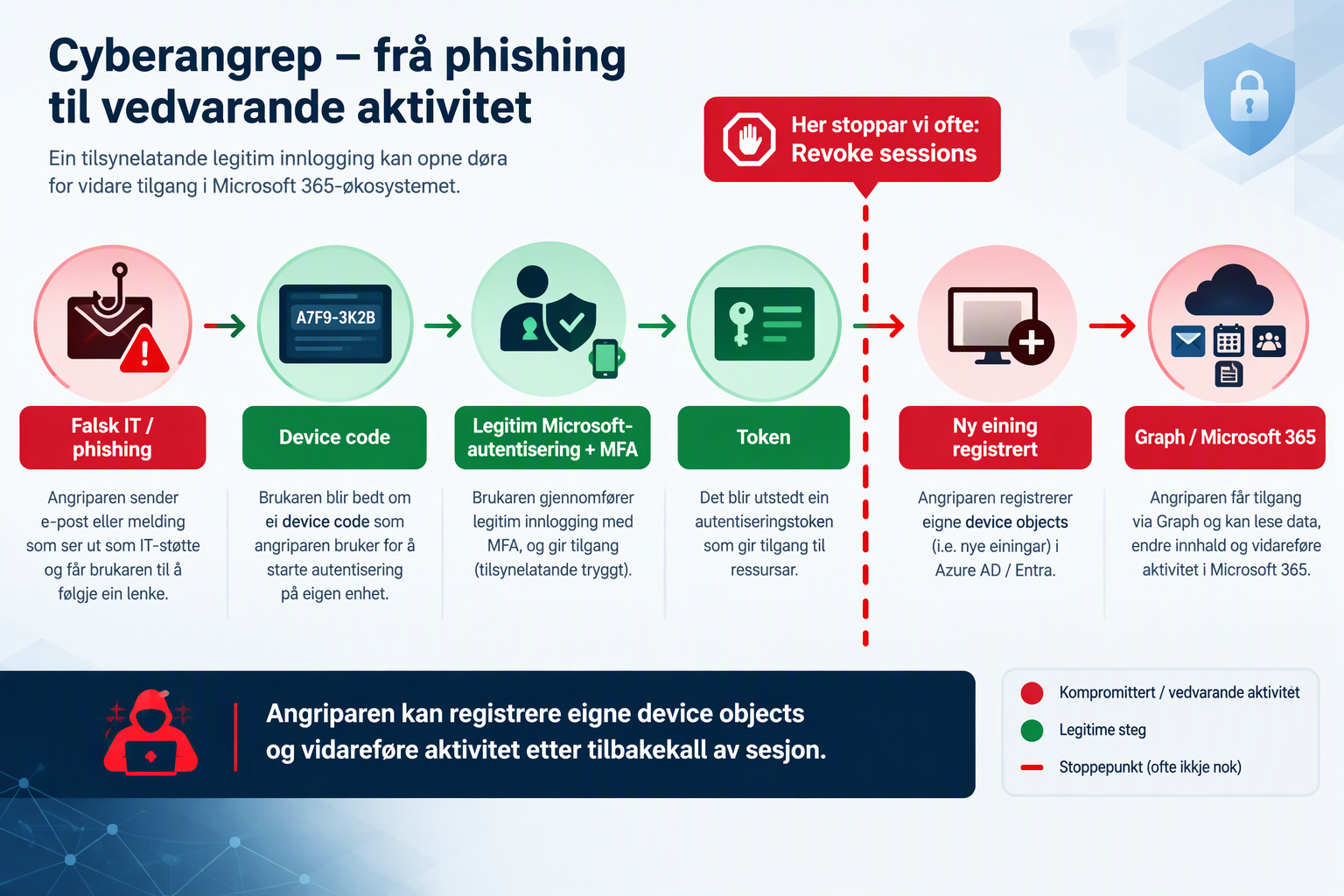
Device code flow is a legitimate OAuth flow. The problem is that the attacker can start the authentication flow and manipulate the user into completing it on Microsoft’s legitimate sign-in page. MFA may be completed, but the user is effectively authorizing a flow the attacker initiated.
The attacker therefore doesn’t necessarily need to break MFA. They can get the user to perform the authentication for them.
Blocking device code flow is therefore part of the CA baseline I would start with. Map usage in Report-only first, find the legitimate needs, and then create explicit, limited exceptions.
What happens on screen isn’t the whole authentication
This was one of the most interesting things I saw in Baden. Passkeys, Windows Hello for Business, device bound credentials, attestation, Primary Refresh Token, Conditional Access, and Token Protection really tell the same story:
Identity doesn’t stop at the user account.
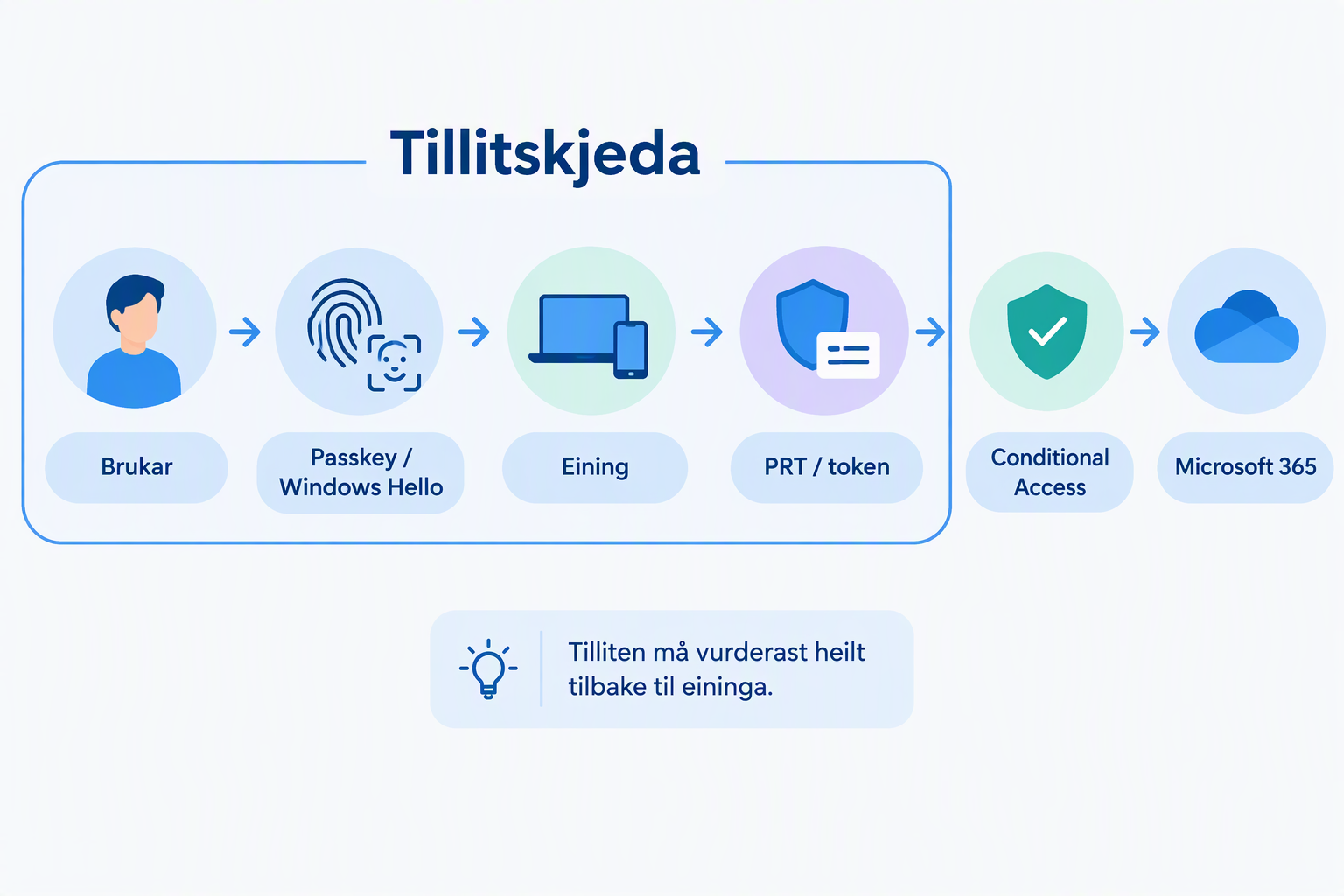
We saw the same in the PAW and Windows 365 discussion. A privileged workspace inside a Cloud PC or VM doesn’t automatically remove risk if the entry point comes from a compromised workstation.
Trust must be evaluated all the way back to the device.
Then came GhostCode
Shortly after Workplace Ninja Summit, eSentire Threat Response Unit documented GhostCode. What interested me was not just how the attacker got in, but what happened next.
Once the victim had completed authentication, automated activity began very quickly. The attacker registered their own device objects.
The attack chain can therefore run from phishing through legitimate device code authentication and a token to device registration and further activity.
Microsoft now documents the same attack chain
On September 22, 2026, Microsoft published an extensive analysis of EvilTokens. Microsoft places device registration in the attack chain and documents detections for device code authentication, token theft, suspicious Entra device join or registration, abnormal Microsoft Graph activity, and malicious inbox rules.
That ties together much of what I had just heard in Baden:
The device is a security boundary.
The social engineering has already moved
On September 9, 2026, Microsoft documented active attacks where people pretended to be IT or helpdesk. Passkey, MFA, and SSO could be used as lures to get the user to complete AiTM or device code authentication.
This is not an argument against passkeys. It’s an argument for understanding the entire authentication process around them.
Revoke sessions is still important
This doesn’t mean Revoke sessions doesn’t work. It’s a central containment measure.
The point is that incident response must also examine what happened between the compromise and the revocation.
What did the attacker manage to change or establish?
I would change the runbook
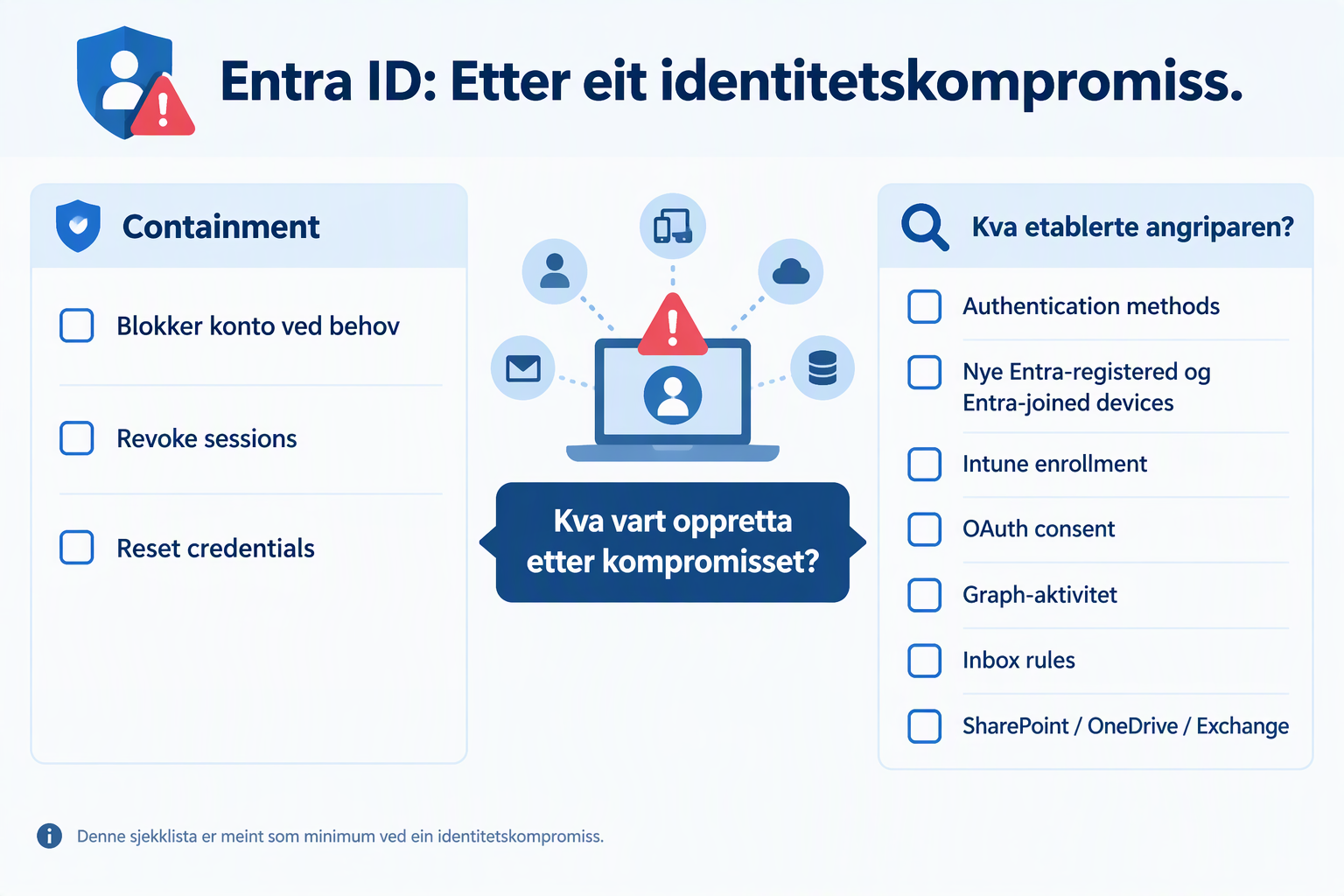
The old mental checklist with reset password, revoke sessions, and MFA checks should get bigger.
At a minimum I would check:
- Block or restrict the account during active compromise
- Revoke sessions
- Reset compromised credentials
- Check new authentication methods
- Check new Entra registered and Entra joined devices
- Check Intune enrollment
- Check suspicious Microsoft Graph activity
- Check OAuth consent and application access
- Check mailbox rules
- Check Exchange, SharePoint, and OneDrive
- Investigate device-related authentication artifacts if the attack picture suggests it
How I would check it in practice
Start with the sign-in logs. Find device code sign-ins and check who signed in, which app was used, and when it happened. If you export logs to Log Analytics or Sentinel, you can start with this query:
SigninLogs
| where AuthenticationProtocol =~ "deviceCode"
    or OriginalTransferMethod contains "device code"
| project TimeGenerated, UserPrincipalName, AppDisplayName,
          AuthenticationProtocol, OriginalTransferMethod, CorrelationId
Then check whether new Entra devices appeared in the same period. This PowerShell example lists devices registered in the past seven days:
Connect-MgGraph -Scopes "Device.Read.All"
$since = (Get-Date).AddDays(-7)
Get-MgDevice -All -Property "displayName,deviceId,registrationDateTime" |
  Where-Object { $_.RegistrationDateTime -ge $since } |
  Sort-Object RegistrationDateTime -Descending |
  Select-Object DisplayName, DeviceId, RegistrationDateTime
Compare the timestamps with the sign-ins, and investigate the owner and subsequent activity for devices you do not recognize. This query alone does not prove that a device belongs to the attacker.
Do this while the logs are still available. Entra ID Free normally retains sign-in and audit logs for 7 days; P1/P2 retains them for 30 days. If you need a longer history, you must export the logs in advance.
A registered device object does not automatically give the attacker lasting access. The impact depends on how the device was registered or joined, which authentication artifacts were issued, and which Conditional Access policies apply. That is exactly why we need to check.
And I would block device code flow
Microsoft recommends blocking device code flow where possible. For Teams devices that actually need it, Microsoft provides specific guidance for controlled exceptions.
Find the accounts that actually need the flow. Document the need. Create the exception. Block the rest.
Microsoft documents both Authentication protocol = Device code flow and Original transfer method = Device code flow in sign-in logs. The latter matters because protocol tracking can link later token activity to the original device code session.
The device is part of the identity
This is perhaps the most important lesson I brought home from Workplace Ninja Summit.
We must make sure we don’t make identity synonymous with just the user account.
In modern Entra ID there’s a larger trust chain:
User → authentication method → token → device → device state → Conditional Access → post‑authentication actions
That means incident response must follow the same chain.
Honestly?
You revoked the session. You reset the password. You checked MFA.
Good.
But did you check what the attacker managed to establish before you kicked them out?
And did you check whether one of those things was their own device in your tenant?